GDPR Cookie Banner Checklist: How to Design, Optimize and Test Consent
A practical guide to cookie banner compliance, consent rate optimization, button wording and technical testing for EU/EEA websites.
A GDPR cookie banner should do more than ask visitors to accept or reject cookies. It should help visitors make informed choices, support a positive user experience and allow your business to collect valuable marketing data when permitted.
For marketers and website owners, cookie consent creates an important commercial challenge: the more visitors who accept optional analytics and advertising technologies, the more useful data may become available for conversion measurement, attribution, remarketing and advertising optimization.
The good news is that GDPR compliance does not prevent you from optimizing your cookie banner for better consent rates. Button wording, purpose explanations, layout and user experience can all influence how visitors respond. There is room to experiment, provided the resulting choices remain clear, freely given and legally valid.
But an effective cookie banner must also work technically. A beautifully designed consent interface is of little value if tracking technologies ignore the visitor's decision.
This guide explains how to design a cookie banner, improve consent rates within the legal boundaries, and test whether the website's tracking technologies actually respect visitor preferences.
1. Cookie banner compliance checklist
Start with these ten checks. Together, they cover both the visitor experience and the underlying technical implementation.
| Check | What to verify |
|---|---|
| Clear purposes | Visitors understand why cookies and tracking technologies are used |
| Accept and reject | Both choices are clearly presented and similarly easy |
| No preselected consent | Optional purposes are disabled by default |
| Granular choices | Visitors can make meaningful choices between different purposes |
| No misleading design | The interface does not undermine free or informed choice |
| No premature tracking | Technologies requiring consent do not operate before consent |
| Rejection works | Declining optional purposes prevents the associated tracking |
| Consent is recorded | The website can demonstrate what visitors agreed to |
| Withdrawal works | Visitors can easily change their preferences |
| Tracking is tested | Browser and server-side technologies respect the relevant consent states |
These checks are a useful starting point, not a guarantee of compliance. Requirements depend on applicable national legislation, the technologies used and the actual processing activities.
2. What does the law require from cookie banners?
Before optimizing your cookie banner, it is important to distinguish legal requirements from design recommendations and commercial decisions.
The term "GDPR cookie banner" is commonly used, but two legal frameworks are especially relevant.
The ePrivacy Directive and national cookie laws
Article 5(3) of the EU ePrivacy Directive regulates storing information on, or accessing information stored on, a user's device.
In general, prior consent is required unless an applicable exception applies. Examples include certain storage or access strictly necessary to provide a service explicitly requested by the user.
The ePrivacy Directive is implemented through national legislation, meaning that the precise rules and regulatory interpretations can differ between EU/EEA countries.
France, for example, applies Article 82 of its Data Protection Act to cookie consent. Other countries have their own implementing rules.
The GDPR defines valid consent
Where consent is required under the applicable rules, its validity is assessed according to the GDPR standard.
Under Article 4(11), consent must be:
- Freely given: Visitors have a genuine choice without inappropriate pressure.
- Specific: Consent relates to clearly defined purposes.
- Informed: Visitors understand what they are agreeing to.
- Unambiguous: Agreement is expressed through a clear affirmative action.
Article 7 also establishes requirements for demonstrating consent and allowing withdrawal.
Where tracking involves personal data, other GDPR obligations may apply, including lawful basis, transparency, purpose limitation, data minimisation and accountability.
Cookies are not the only tracking technologies covered
Replacing cookies with tracking pixels, local storage, device identifiers or server-side technologies does not automatically eliminate consent requirements.
The European Data Protection Board's final Guidelines 2/2023 examine how Article 5(3) applies to technologies beyond traditional cookies, including certain URL-based and pixel-based tracking.
The correct approach is to assess what information is stored or accessed, how the technology works and which exceptions, if any, apply.
The practical takeaway: Start by identifying your tracking technologies and their purposes. Then determine which activities need consent instead of assuming that all cookies require consent or that all cookieless technologies are exempt.
Sources: GDPR, Articles 4 and 7; EDPB Guidelines 2/2023 on the technical scope of Article 5(3).
3. How should a GDPR cookie banner be designed?
A well-designed cookie banner should provide understandable information and allow visitors to make their choice without unnecessary friction.
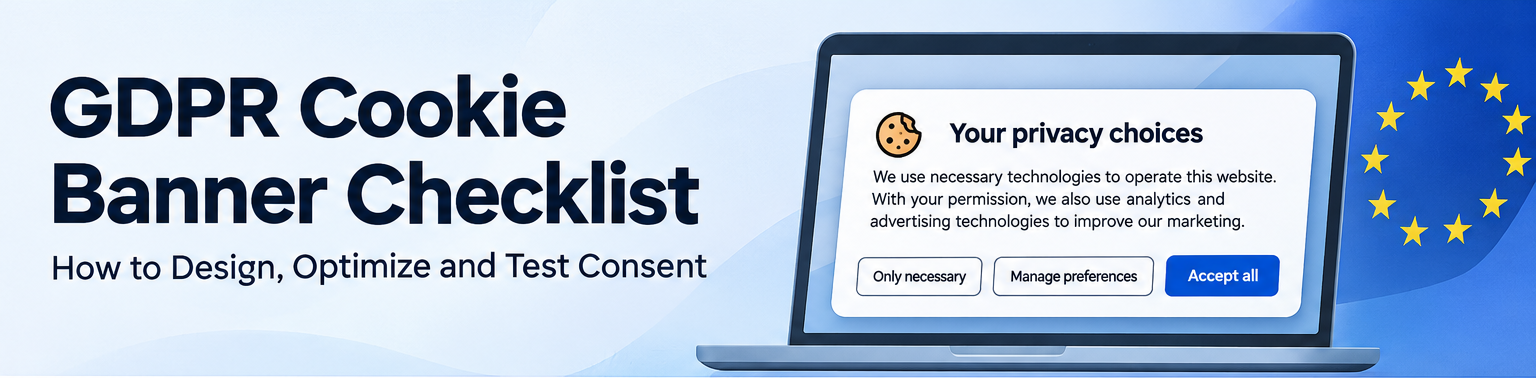
For most marketing websites, a practical starting point is to provide three options on the initial banner:
Accept all | Only necessary | Manage preferences
An example could look like this:
Your privacy choices
We use necessary technologies to operate this website. With your permission, we also use analytics and advertising technologies to understand website performance, measure conversions and improve our marketing.
You can accept optional technologies, continue with necessary technologies only, or customize your preferences. You can change your choice at any time through Cookie Settings.
Only necessary | Manage preferences | Accept all
The wording must be adapted to the technologies and processing actually used. If information about relevant recipients and purposes cannot be presented adequately in the initial text, provide it through an accessible additional layer.
Make accepting and declining equally easy
One of the most important principles is that visitors should not face unnecessary difficulty when declining optional tracking.
Problematic designs can include:
- An Accept All button on the first layer while rejection requires several additional clicks.
- A prominent acceptance button combined with an almost invisible refusal link.
- Rejection hidden inside paragraphs of explanatory text.
- Wording that makes declining appear to break the website.
- Repeated prompts encouraging acceptance after a visitor has already declined.
The EDPB Cookie Banner Taskforce found broad agreement among authorities about these problems, although regulators have not established one universal cookie banner layout.
The Dutch Data Protection Authority explicitly recommends presenting acceptance and rejection on the same layer, without additional clicks to decline.
Avoid preselected optional consent
Visitors should not have to deactivate optional tracking to avoid giving consent.
A preferences panel could start with the following configuration:
| Purpose | Default |
|---|---|
| Strictly necessary technologies | Active, where an exemption applies |
| Optional analytics | Disabled |
| Advertising and remarketing | Disabled |
| Personalisation | Disabled |
The website should explain necessary technologies rather than pretending that visitors have to consent to operations that genuinely qualify for an exception.
Provide meaningful choices
Not all visitors want the same degree of tracking.
Some may accept analytics but not personalised advertising. Others may accept both.
Where different purposes require separate consent, the interface should allow meaningful choices rather than forcing visitors to accept every optional purpose together.
For marketers, this can also be commercially useful. A visitor who does not want advertising tracking may still be willing to consent to analytics, providing measurement opportunities that could be lost with an unnecessarily all-or-nothing choice.
Sources: EDPB Cookie Banner Taskforce Report; Dutch DPA guidance on clear cookie banners.
4. Can you optimize your cookie banner to increase consent rates?
Yes. There is legitimate room to optimize cookie consent rates without compromising the validity of consent.
This is an important distinction for marketers and website owners.
The law establishes requirements for valid consent, but it does not prescribe every word, button label, sentence structure or design decision that a cookie banner must use.
Within those boundaries, businesses can test different ways to explain the benefits of optional processing and present the available choices.
A higher consent rate can have real commercial value. Depending on the tracking setup, more valid consent may improve the amount of information available for conversion measurement, advertising optimization and audience analysis.
However, a higher consent rate is only useful if the resulting consent remains valid.
Button wording can influence visitor behavior
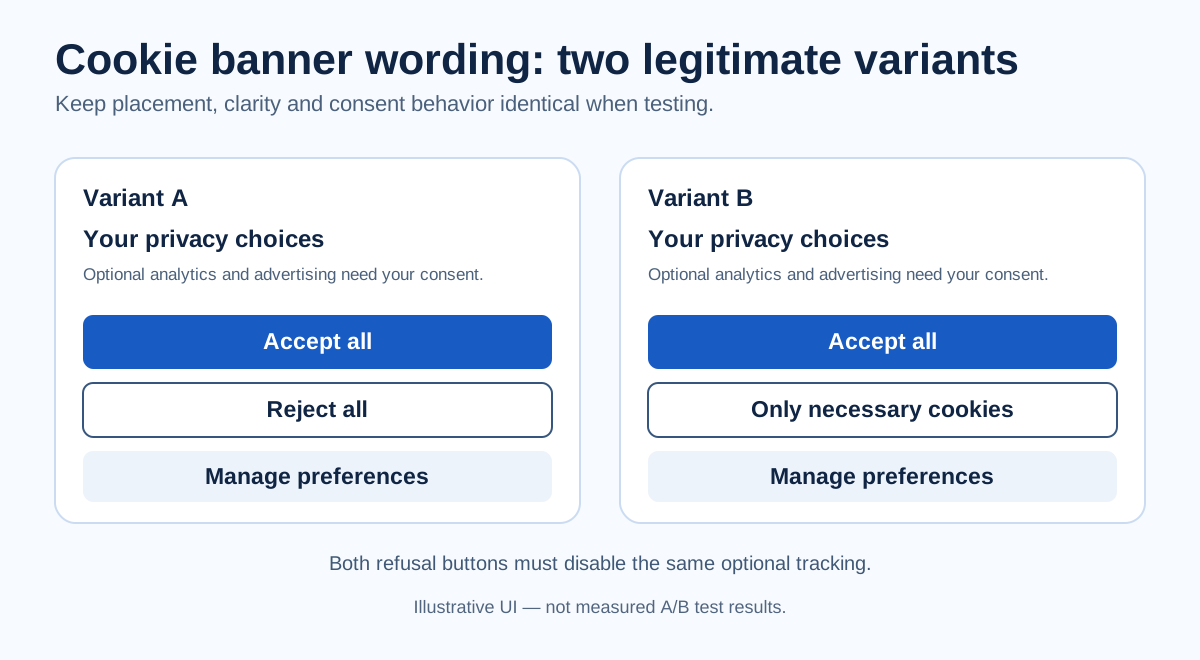
Consider three alternatives for the button used to decline optional tracking:
- Reject all
- Reject non-essential
- Only necessary cookies
All three can represent exactly the same technical decision: the visitor declines optional tracking while the website continues using genuinely necessary technologies.
But the wording presents that decision differently.
"Reject all" emphasizes refusal.
"Reject non-essential" explains which category of technologies is being declined.
"Only necessary cookies" focuses on which technologies remain enabled.
These differences can affect how visitors understand and respond to the choice.
In practical A/B testing, a website may find that "Only necessary cookies" produces fewer refusals than "Reject all" despite the two buttons triggering identical consent states.
That is a hypothesis worth testing on your own audience, rather than a universal performance claim. Results can depend on language, visitor expectations, device type, surrounding information and visual design.
The commercial opportunity is to identify wording that visitors understand and that supports the website's objectives without misleading them.
Which cookie banner button wording is best?
There is no universally optimal wording. Each alternative has advantages and considerations.
| Button wording | Potential advantage | What to watch |
|---|---|---|
| Reject all | Very explicit refusal | May suggest necessary cookies are also rejected |
| Reject non-essential | Clarifies what is declined | Requires visitors to understand "non-essential" |
| Only necessary cookies | Positive description of what remains enabled | Must clearly communicate refusal of optional tracking |
| Continue without accepting | Describes proceeding without consent | Must not obscure what is being declined |
| Manage preferences | Encourages granular decisions | Must not substitute for a readily available refusal option |
Our recommendation: Test clear alternatives such as "Reject all", "Reject optional" and "Only necessary cookies", while keeping the choices equally accessible.
"Only necessary cookies" can be an informative alternative because it describes the resulting configuration rather than only the act of rejection.
However, context matters. In December 2024, the French CNIL identified a problematic interface where acceptance appeared repeatedly while refusal appeared only once, with less explicit wording.
That does not mean softer wording is inherently unlawful. It illustrates why button labels cannot be evaluated separately from their placement, visibility and surrounding information.
Explain the benefits of optional cookies
Button wording is only one opportunity.
The text explaining why optional technologies are used can also affect consent rates.
Compare these examples.
Generic explanation:
"We use cookies to improve your experience."
More informative explanation:
"With your permission, we use analytics to understand which pages visitors find useful and advertising technologies to measure how our campaigns perform."
The second explanation tells visitors more about the actual purposes.
A retailer might describe analytics as helping it identify problems in the shopping experience, while explaining that advertising technologies support conversion measurement and relevant marketing.
This can make the decision more understandable without implying that accepting is required or that all tracking benefits the visitor directly.
Avoid vague promises such as "the best possible experience" when they conceal advertising or cross-site tracking.
The goal is to communicate the real purpose and value of processing, not invent benefits.
Use granular choices to capture more legitimate consent
Suppose a visitor is comfortable allowing website analytics but does not want advertising-related tracking.
If the only options are Accept All and Reject All, that visitor may decline everything.
Offering a clearly explained analytics-only option can allow the visitor to agree to a narrower purpose.
For businesses, this may preserve some useful analytics measurement without requiring broad acceptance.
However, additional preferences also introduce complexity.
A large number of poorly explained categories can confuse visitors and reduce confidence in the interface.
Our recommendation: Provide meaningful purpose categories, keep them understandable and avoid creating unnecessary choices merely to influence behavior.
Can you use button colours and visual emphasis?
Button colours, contrast, size and position can influence which options visitors notice.
The EDPB Cookie Banner Taskforce did not establish a universal requirement that every button must have identical colours or dimensions. It emphasised evaluating the overall presentation and whether visitors could be misled.
This leaves some design flexibility.
However, the absence of a universal colour rule does not mean businesses can make the rejection option difficult to see.
The Dutch DPA and French CNIL have criticised designs that disproportionately emphasize acceptance or obscure refusal.
For example, an easily visible Accept All button combined with a low-contrast Reject link may undermine the visitor's freedom of choice.
A safer optimization strategy is to improve the clarity and attractiveness of the whole interface, rather than reducing the visibility of refusal.
How to A/B test cookie banner wording
Consider an experiment comparing two banners with identical layouts and technical behavior.
Version A
Accept all | Reject all | Manage preferences
Version B
Accept all | Only necessary cookies | Manage preferences
The only experimental change is the refusal label.
Both buttons must produce the same rejection state and both choices should remain readily understandable.
Measure the following outcomes:
| Metric | Why it matters |
|---|---|
| Acceptance rate | Percentage of eligible banner exposures resulting in acceptance |
| Rejection rate | Percentage resulting in refusal of optional purposes |
| Preference selection rate | How often visitors choose individual purposes |
| No-choice rate | How often visitors continue without making a choice |
| Consent withdrawal rate | Whether visitors subsequently reverse their decision |
| Consent comprehension | Whether visitors correctly understand the available choices |
Use the same definitions and measurement methods across variants. Randomize comparable visitors where feasible, and analyse mobile and desktop results separately when differences are meaningful.
Most importantly, review the winning version for clarity and consent validity before adopting it.
An experiment showing a higher acceptance rate does not by itself demonstrate that the design is legally acceptable.
Example: If a wording change increases acceptance but also causes more visitors to misunderstand what they have agreed to, it is not a successful consent optimization.
How should you measure cookie banner experiments?
There is a practical measurement challenge: the consent banner needs to be assessed before the visitor has necessarily agreed to analytics.
You should not assume that you can simply send all banner impressions, refusals and interactions to your normal analytics platform.
Instead, consider whether the CMP provides appropriate aggregated reporting, whether measurement can be performed without consent under applicable rules, or whether controlled usability testing can provide the necessary evidence.
The legal assessment must consider the information collected, any identifiers used, storage or device access, and the applicable national rules.
In particular, avoid introducing additional tracking that requires consent merely to measure visitors who declined tracking.
Commercial optimization opportunities beyond button wording
Consent rates may also be affected by the overall user experience.
Potential improvements include:
- Making the banner readable and usable on mobile devices.
- Reducing unnecessary text without removing essential information.
- Explaining purposes in language appropriate to the audience.
- Using a preferences interface that is easy to understand.
- Removing unnecessary consent categories.
- Avoiding excessive interruptions and repeated prompts.
- Making the website's privacy information easy to access.
These improvements may increase trust and reduce friction without weakening the visitor's ability to decline.
They are also useful regardless of whether they increase the measured acceptance rate.
What should marketers avoid?
Optimizing consent should not become an exercise in obtaining agreement through confusion.
Avoid designs that make rejection difficult, use misleading button labels, conceal purposes, imply that optional tracking is necessary or repeatedly pressure visitors into changing their minds.
A short-term increase in acceptance obtained through misleading design can create legal exposure and undermine trust.
The objective is to maximize legitimate, informed consent — not acceptance at any cost.
Sources: EDPB Cookie Banner Taskforce Report; CNIL on misleading cookie banners; Dutch DPA cookie banner guidance.
5. What happens before the visitor clicks?
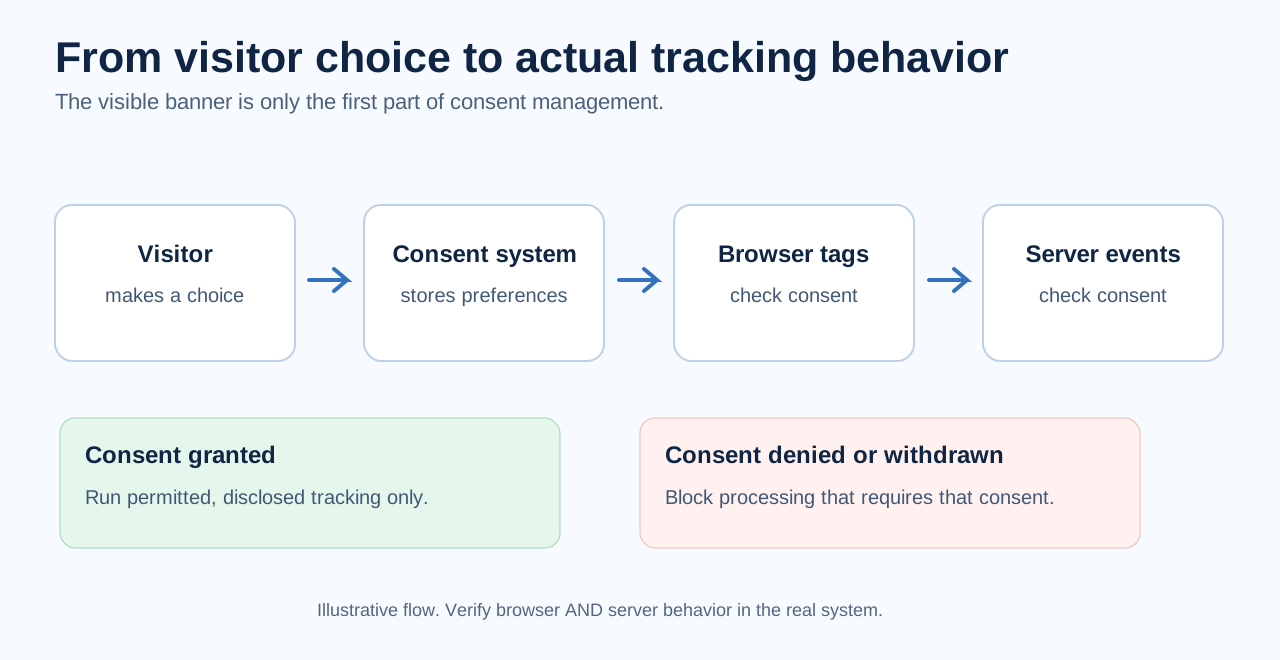
An effective consent interface is only one part of the solution.
Imagine visiting a website for the first time.
A cookie banner appears, but before you make any decision, the website has already transmitted information to Google Analytics, Google Ads or Meta.
The banner may look appropriate, yet the underlying technology could already have performed operations requiring consent.
That is why the technical behavior of a website must be inspected separately from its consent interface.
Example: An online shop with marketing tracking
Consider a fictional online store using:
- Google Analytics 4 for website measurement.
- Google Ads conversion tracking.
- Meta Pixel for advertising measurement.
- A consent management platform.
- A server-side tagging endpoint.
The website owner wants to measure sales, understand advertising performance and optimize campaigns.
These are legitimate commercial objectives.
The question is how to achieve them within the applicable legal and technical boundaries.
An initial audit should establish what happens before consent, what changes after consent and how rejection or withdrawal affects each technology.
Does Google Consent Mode solve the problem?
Google Consent Mode provides a technical mechanism for communicating consent states to Google tags.
However, its behavior depends on how it is implemented.
Basic Consent Mode blocks Google tags requiring consent until the relevant consent has been granted.
Advanced Consent Mode allows Google tags to load before consent, potentially transmitting cookieless pings while consent is denied.
Advanced Mode can provide additional information for Google's measurement modelling. That can be commercially attractive for advertisers.
But the absence of traditional cookies does not automatically make a request anonymous or establish that the associated processing is exempt from applicable requirements.
A business should evaluate the actual data transmitted, the relevant legal rules and the measurement benefits before choosing an implementation.
For more context, read our Google Ads and GDPR guide and GA4 privacy guide.
6. How to test your cookie banner using Chrome DevTools
You do not necessarily need an expensive compliance platform to perform an initial technical inspection.
Chrome DevTools can reveal network requests, cookies and other browser storage activities.
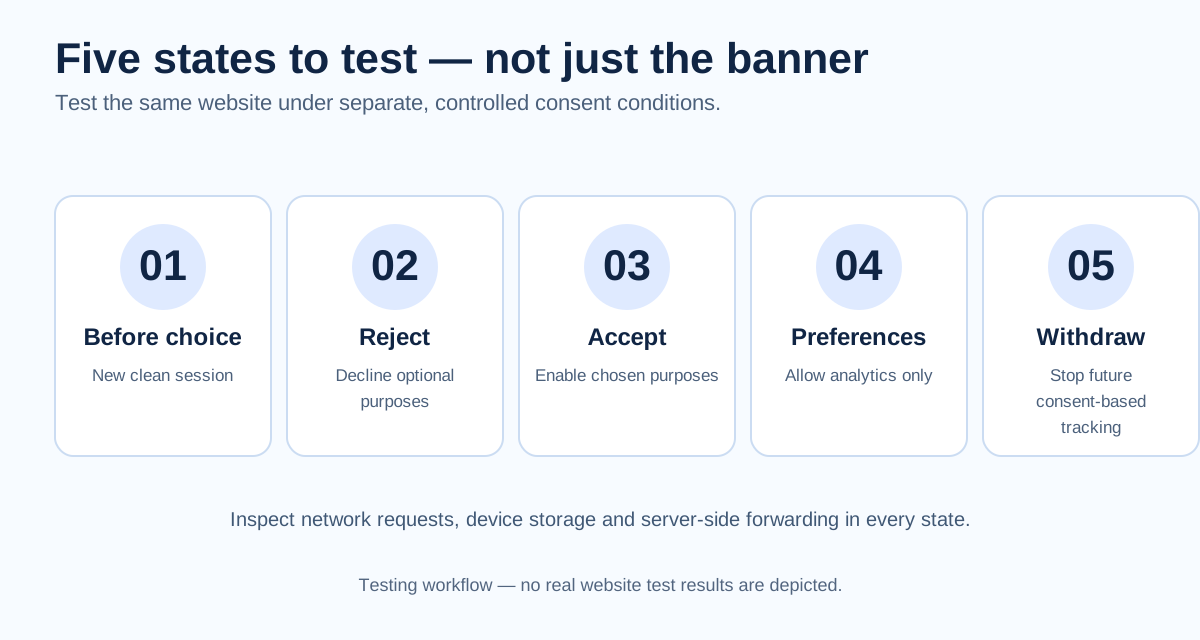
The following procedure helps you compare what the website does under different consent conditions.
Step 1: Start with a clean browser session
Open a new browser profile or a private browsing session.
Make sure the website has no previous consent choice stored.
Open Chrome Developer Tools and select the Network tab.
Enable Preserve log and, for controlled testing, Disable cache.
Open the Application panel as well, so you can inspect cookies and other browser storage.
Disable browser extensions that might interfere with tracking during the test.
Step 2: Load the website without making a choice
Visit the website.
Do not select Accept, Reject or Manage Preferences.
Observe the network requests and browser storage.
Look for:
- Requests to advertising and analytics providers.
- Tracking endpoints hosted on the website's own domain.
- Cookies created before consent.
- Local storage and other device storage.
- Identifiers or personal data in request parameters.
- Information transmitted through tracking pixels.
Record the results.
Expected behavior: Technologies requiring prior consent should not perform their consent-dependent operations before that consent has been obtained.
Not every external request necessarily requires consent. Assess the technology, contents and purpose rather than classifying all network activity as unlawful tracking.
Step 3: Test rejection
Start a clean session and select the button that declines optional technologies.
Continue browsing the website.
Visit product pages, navigate between sections and perform representative actions.
Inspect whether advertising and analytics technologies requiring consent remain disabled.
Pay particular attention to requests triggered by specific interactions.
Expected behavior: Rejection should prevent tracking that depends on the declined consent.
If relevant requests continue, investigate their purpose and whether they are permitted in that consent state.
Step 4: Test acceptance
Start another clean session.
Select Accept All.
Inspect which requests and cookies now appear.
Verify that the enabled tracking technologies correspond to the purposes explained in the banner.
For example, an analytics consent choice should not automatically authorize unrelated advertising processing.
Consent for one purpose must not be treated as unrestricted permission to transmit information for other purposes.
Step 5: Test granular preferences
Open the preferences panel.
Enable analytics while keeping advertising disabled.
Save the selection.
Inspect whether analytics technologies behave according to the chosen consent state and advertising tracking requiring consent remains disabled.
Repeat using other relevant combinations.
This step is especially important when a website uses multiple advertising and analytics platforms.
A CMP may report one consent state while individual tags interpret it differently.
Step 6: Test consent withdrawal
Start a clean session and accept the optional purposes.
Verify the resulting tracking behavior.
Then reopen Cookie Settings and withdraw consent.
Navigate to another page, refresh the website and perform actions that normally generate events.
Check whether further consent-dependent tracking stops.
Also inspect cookies, other stored identifiers and any relevant server-side forwarding.
Expected behavior: Withdrawal must take effect for future processing based on the withdrawn consent.
Previously collected information may require separate decisions concerning retention, deletion and other applicable obligations. Withdrawal does not automatically mean every historical record must immediately be erased.
Step 7: Check server-side tracking
Browser-side testing is not always sufficient.
If the website forwards events through a server-side tagging system or another backend integration, verify that the consent state reaches the server and is respected there.
Otherwise, the browser may stop sending events directly to an advertising platform while the server continues forwarding events.
The website owner needs to understand both data flows.
7. Cookie consent technical test matrix
A repeatable test matrix makes it easier to identify problems and verify fixes.
| Test scenario | Expected result | Status |
|---|---|---|
| Fresh visit, no choice | Consent-dependent tracking remains disabled | Pass / Fail |
| Reject optional purposes | Optional tracking requiring consent remains blocked | Pass / Fail |
| Accept all | Relevant technologies operate as disclosed | Pass / Fail |
| Analytics only | Analytics behaves according to consent; advertising remains blocked where required | Pass / Fail |
| Advertising only | Only the selected purposes operate | Pass / Fail |
| Withdraw consent | Future processing based on withdrawn consent stops | Pass / Fail |
| Reload after rejection | Previous rejection remains respected | Pass / Fail |
| Navigate to another page | Consent behavior remains consistent | Pass / Fail |
| Trigger a conversion event | Event respects the applicable consent state | Pass / Fail |
| Server-side forwarding | Backend processing respects consent and allowed purposes | Pass / Fail |
Record the test date, URL, browser, CMP configuration, expected behavior, observed behavior and responsible person.
Where possible, preserve redacted request examples or screenshots as evidence.
Why a cookie scanner is not enough
Automated scanners can identify cookies, storage and many tracking requests.
However, they may miss behavior that occurs only after specific user actions, on certain pages or through server-side integrations.
A scanner may also identify a technology without accurately establishing its purpose or applicable consent requirement.
A meaningful audit therefore combines automated discovery, manual browser testing and review of relevant server-side behavior.
8. Make consent withdrawal as easy as acceptance
GDPR Article 7(3) requires withdrawal of consent to be as easy as giving consent.
If accepting optional cookies requires one straightforward action, withdrawal should not require navigating through a complex series of pages.
Practical solutions include a persistent Cookie Settings link in the footer, an accessible privacy preferences control or a clearly identifiable settings icon.
The mechanism should remain available after the initial banner disappears.
Visitors should also be informed about their ability to withdraw consent before they give it.
The technical challenge
Consider a visitor who accepts advertising cookies and later disables advertising through Cookie Settings.
The CMP updates its stored preference.
However, an advertising script continues sending events because it does not respond correctly to the updated consent state.
The interface suggests that tracking has stopped, but the technical implementation behaves differently.
This is why withdrawal must be tested, not just presented as an available interface option.
For systems that send information to other organisations, the website owner must also assess how withdrawal affects the relevant downstream processing.
9. Cookie banner fines: What enforcement cases teach us
European regulators have repeatedly taken action against websites with misleading cookie interfaces and inadequate consent mechanisms.
Several French enforcement decisions provide useful practical lessons.
Google: €150 million in December 2021
On 31 December 2021, the French CNIL imposed fines totalling €150 million on Google LLC and Google Ireland Limited in proceedings involving google.fr and youtube.com.
The central issue concerned how easily users could accept cookies compared with how difficult it was to refuse them.
The case illustrates the importance of making refusal straightforward.
Microsoft: €60 million in December 2022
The CNIL fined Microsoft Ireland Operations Limited €60 million in a case concerning bing.com.
The findings included advertising-related cookies placed without consent and an inadequate mechanism for refusing cookies as easily as accepting them.
This case demonstrates that regulators assess technical behavior as well as interface design.
Facebook: €60 million in December 2021
The CNIL fined Facebook Ireland Limited €60 million following an investigation into the cookie consent interface on facebook.com.
The authority found that refusing cookies was more complicated than accepting them.
The case illustrates why unnecessary friction around rejection can undermine consent.
TikTok: €5 million in December 2022
The CNIL fined TikTok €5 million in a case involving difficulties in refusing cookies and insufficient information about their purposes.
The decision highlights the importance of both genuine choice and adequate information.
What marketers should learn from these decisions
These cases do not establish that every website must use an identical banner.
They demonstrate that authorities examine whether visitors can make informed choices without misleading design, and whether the website's technology respects the applicable requirements.
For marketers, the central lesson is that optimization must remain within those boundaries.
A button wording experiment that preserves genuine choice is different from making refusal intentionally difficult.
The amount of a fine depends on the individual circumstances and should not be treated as an automatic penalty associated with one specific design choice.
10. Common cookie banner mistakes
Even experienced marketing teams and website developers can overlook important parts of consent management.
Mistake 1: Assuming a CMP guarantees compliance
A consent management platform provides useful technical functionality, but the website owner still needs to verify its configuration and integration.
A CMP badge is not proof that tracking behaves correctly.
Mistake 2: Focusing only on acceptance rates
A higher acceptance rate is commercially attractive, but it does not establish that consent is valid.
Evaluate whether visitors understand the available choices and whether the implementation respects them.
Mistake 3: Treating all analytics as automatically exempt
Some narrowly configured analytics may qualify for exemptions under applicable national rules.
However, ordinary marketing analytics implementations should not be assumed exempt without examining their purposes, configuration and data flows.
Mistake 4: Assuming cookieless tracking requires no consent
Tracking pixels, URL parameters and other techniques may still fall within applicable device-access rules or involve personal data processing.
The technical design needs to be assessed rather than relying on the absence of cookies.
Mistake 5: Testing only the homepage
Additional tracking may appear on product pages, forms, checkout processes and logged-in areas.
Test representative user journeys.
Mistake 6: Forgetting about server-side events
Moving tracking to a server does not automatically remove legal obligations.
Verify which data the server receives and forwards, and how consent states affect those operations.
Mistake 7: Making withdrawal unnecessarily difficult
A visitor should not face significantly more friction when withdrawing consent than when giving it.
An accessible mechanism must also work technically.
Mistake 8: Using outdated cookie information
The consent interface and related notices should accurately describe the technologies currently in use.
New plugins, advertising integrations and website changes can make existing descriptions incomplete.
11. Who is responsible for cookie banner compliance?
Website operators should not assume that compliance is entirely the responsibility of their consent management provider, advertising platform or web agency.
The precise legal roles depend on the processing involved, but the website owner needs enough knowledge and control to assess its implementation.
A practical operational division can look like this:
| Role | Responsibility |
|---|---|
| Marketing team | Define the commercial objectives, purposes and desired tracking capabilities |
| Developer or agency | Implement consent controls and verify technical behavior |
| Privacy/legal team | Assess legal requirements, disclosures and risks |
| Website owner | Approve the configuration and ensure ongoing reviews |
Consent management should also be part of normal website change management.
A new advertising tag, CMP update, plugin or conversion integration may alter the data being collected or transmitted.
Retesting after material changes helps prevent the website from drifting away from its intended configuration.
12. Frequently asked questions
Does every website need a cookie banner?
No.
A website using only technologies covered by applicable consent exemptions may not need a consent banner, although transparency and other legal obligations can still apply.
The requirement depends on the technologies and their purposes rather than simply whether the website uses cookies.
Is a Reject All button legally mandatory?
There is no universally prescribed wording applicable to every EU/EEA website.
The precise requirements depend on national legislation and regulatory interpretation.
The EDPB Cookie Banner Taskforce recorded broad support for an accessible refusal option on the first layer, while acknowledging differences between authorities.
The French CNIL and Dutch DPA emphasize that refusing consent should be as easy as accepting it.
Can I use "Only necessary cookies" instead of "Reject all"?
Potentially, yes.
What matters is whether visitors understand that selecting the button declines optional tracking, and whether the choice is sufficiently clear and accessible in the overall interface.
The label should accurately describe what happens when selected.
Because regulatory expectations and language conventions can differ between jurisdictions, the entire banner should be evaluated rather than the button wording alone.
Which cookie banner wording gets the highest acceptance rate?
There is no universally reliable winning phrase.
Acceptance rates depend on the audience, language, design, surrounding information and website context.
Testing "Reject all" against "Only necessary cookies" may reveal useful differences, but the results must be assessed alongside visitor understanding and the validity of consent.
Can cookie banner button colours be optimized?
Yes, within the applicable requirements.
No universal colour scheme is legally prescribed, but the overall design must not mislead visitors or make refusal unnecessarily difficult.
Buttons should be sufficiently visible, readable and accessible.
Can I improve consent rates by explaining why we use analytics?
Yes, clearly explaining the actual purposes of analytics and advertising technologies can improve the visitor's understanding and may influence consent decisions.
The explanation must remain accurate and should not imply that optional processing is necessary to use the website.
Can visitors consent by continuing to browse?
Merely continuing to browse, scrolling or remaining on a page does not generally satisfy the GDPR requirement for a clear affirmative act of consent.
Are necessary cookies exempt from consent?
Certain storage or access can qualify for an exception under national laws implementing the ePrivacy Directive.
The fact that a website labels a technology "necessary" does not establish that the exception applies.
Necessity must be assessed against the relevant purpose and service.
Can I use Google Consent Mode without a cookie banner?
Consent Mode is a technical mechanism for communicating consent states.
It does not itself obtain valid consent or remove the need for an appropriate consent mechanism where consent is legally required.
Does a cookie banner make my website GDPR-compliant?
No.
A cookie banner addresses only part of the website's privacy requirements.
Other obligations may include lawful basis, transparency, data minimisation, processor agreements, international transfers, retention and security.
13. Conclusion: Better consent, better measurement and better privacy
A good cookie banner should work for both the visitor and the business.
Visitors need meaningful, understandable choices about optional tracking technologies.
Businesses need reliable ways to measure performance, improve advertising and understand how their websites are used.
These objectives are not inherently incompatible.
Marketers can improve the way consent is requested, test alternative button wording, explain the value of analytics and provide better preference controls without compromising the legal validity of consent.
At the same time, website owners must verify that the technical implementation actually respects visitor decisions.
A practical consent strategy combines three areas:
- Compliance: Understand the applicable requirements and provide genuine choices.
- Optimization: Improve clarity, usability and consent rates through legitimate experimentation.
- Verification: Test that cookies, pixels and server-side technologies behave according to the chosen consent states.
The goal is not simply to display a cookie banner or maximize the number of visitors clicking Accept.
The goal is to obtain as much valid, useful consent as possible while respecting visitors' choices and maintaining trustworthy measurement.
For related guidance, read our Google Ads and GDPR guide, Meta Ads and GDPR guide and GA4 privacy guide.
Primary references
- GDPR — Regulation (EU) 2016/679, particularly Articles 4, 7, 12 and 13.
- EDPB Cookie Banner Taskforce Report, January 2023.
- EDPB Guidelines 05/2020 on consent.
- EDPB Guidelines 2/2023 on the technical scope of Article 5(3), final version.
- Dutch Data Protection Authority: Clear cookie banners.
- CNIL: Dark patterns in cookie banners, December 2024.